Showing posts with label PHONES. Show all posts

Friday, August 1, 2014

Airtel Free DNS Tunneling on Android with Your Freedom

Your Freedom's Android version can be used as a DNS tunneling App on non rooted ICS, Jelly Bean devices. It will also work with rooted devices as well. So nothing to worry about. But remember DNS tunneled internet is very slow. This trick should work with almost all operators.

Enable DNS Tunneling on ICS, Jelly Bean And Other Android OS with Your Freedom 


USUAL STUFF YOU WILL NEED

AIRTEL SIM CARD  (with  0  balance or credit )
ANDROID PHONE ( works for ever android device and os)
APN or ACCESS POINT ( eg  Access point for Airtel in Ghana is " internet " )


ITS FREE!!!!  SAVE YOUR MONEY

Sunday, July 13, 2014

INTERNET SETTINGS FOR GHANA NETWORK ( BY FREEMAN )

NOTE:  THAT YOU CAN ALSO USE THIS SETTING ANY WHERE IN THE WORLD TO SETUP ANY PHONE LIKE HTC,IPHONE,SAMSUNG AND MORE IN THE WORLD......ALL YOU NEED IS THE APN OF THE NETWORK YOU ARE USING IN YOUR COUNTRY.......ENJOY

THANKS FOR VISITING MY BLOG


Hi there, I am glad you have taken this effort to get to this far. This means a lot to me and I promise not to disappoint your expectations. This GUIDE is filled with everything you need to know in order to be able to
setup internet access on your gadgets and devices for every network in Ghana, except Expresso (Kasapa)

Monday, December 2, 2013

How to Speed Up Your Android Phone

Android Smartphone have Large number of Apps and games in Android Market. When we download any Application and Install it on mobile it uses some RAM to run the App hence when you are running two or more application in background it uses Large amount of RAM memory and decreases your Phone performance. The Important thing about Android is that  it can do Multitasking  so that large no of apps can run simultaneously. Their are many inbuilt Apps which runs continuously and uses your Memory. So here are some Methods which will boost your Android Performance.
 Upgrade Android Version
Upgrade  to latest firmware So that it will remove all bugs and will install latest new features in

Friday, November 22, 2013

Top 5 Tips and Tricks You Need to Know : Nexus 7


Nexus 7 (2013)The new Nexus 7, with its great set of specs, continues to be the most responsive and easy-to-use tablet on the market. This 7-inch plain looking tablet is priced at just $230, and thus delivers quality on budget.

Saturday, November 16, 2013

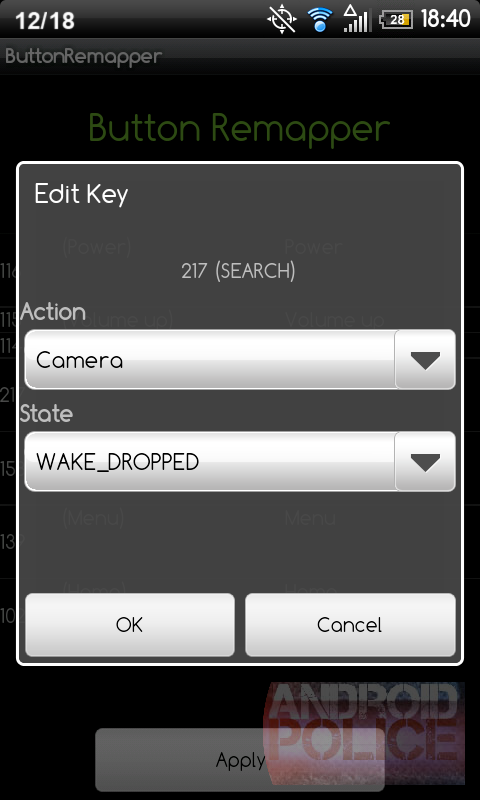
Modder’s Column: How To Remap Your Android Phone’s Hardware Buttons Without Touching A Single Line Of Code

So maybe you've recently upgraded your Android phone and haven't gotten used to the new device's button alignment yet... or maybe you never use that pesky Search key and want to turn it into the camera key your EVO 4G has always wanted... or maybe you just enjoy tinkering with your phone. If you're in one of those situations, what you may be lusting after is a way to remap your phone's hardware buttons (i.e. making the Search key take on the duties of the Home key, or vise versa).
Up until now, there haven't been any user-friendly methods of doing this, at least not any that can be so greatly customized. Well, the deprivation is over - Beansoft (also known as appelflap around the XDA-Developers forums) has developed the handy ButtonRemapper app, which provides users a simple-as-can-be way of remapping the staple Android buttons (Home, Menu, Back, and Search). The app does more than that, however - read on for the full story.
snap20101218_184033_wm snap20101218_184050_wm snap20101218_184059_wm
For starters, it's not just the staple Android keys that can be remapped using ButtonRemapper - you can

Wednesday, November 13, 2013

LG Optimus Black P970 hard reset, Hard reset all LG Phones Models


Before you buy a new cell phone or new tablet, please try the following procedure to repair your device. First charge your battery, backup your important data if possible and in most cases take out SIM and SD card. It is impossible to recover your data after doing a hard reset, so online backup is always important.
For all of your data, a backup should be done on an external device, hard drive, raid system or media. With or without insurance, if your cell phone lost, damaged or stolen at least your invaluable data is backed up in a safe place.


Hard reset LG Optimus Black P970 full reset
dial 3845#* 970#
WARNING: All of your data will be lost!
or USE LG mobile support tool > P970 Recovery mode
LG software update
1. With the phone turned off, hold the Home and Volume Down button and keep pressing them, then
2. Press and hold the Power button too until the device turns on
LG P970 hard reset
If the device has frozen
1. Take out battery.
2. Reinsert it.
LG P970 reset
Free counters!