Friday, August 1, 2014

Enjoy Live Football match and others on PC using Internet ( Dstv for PC )

  1. Download VLC Media Player, Install and RUN the Player on your Windows PC.
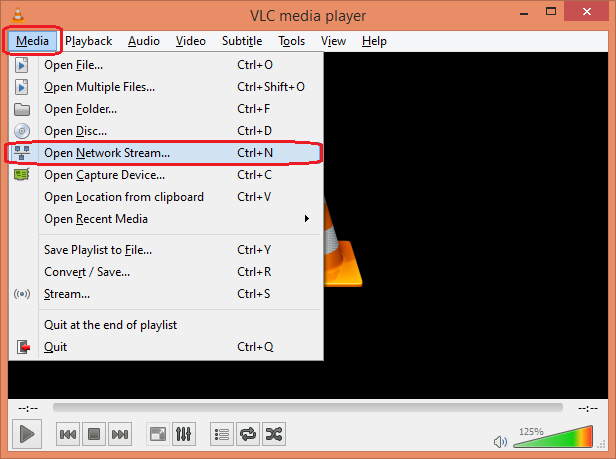
  2. Click Media. Then click Open Network Stream....
VLC - Open Network Stream
 

Airtel Free DNS Tunneling on Android with Your Freedom

Your Freedom's Android version can be used as a DNS tunneling App on non rooted ICS, Jelly Bean devices. It will also work with rooted devices as well. So nothing to worry about. But remember DNS tunneled internet is very slow. This trick should work with almost all operators.

Enable DNS Tunneling on ICS, Jelly Bean And Other Android OS with Your Freedom 


USUAL STUFF YOU WILL NEED
AIRTEL SIM CARD  (with  0  balance or credit )
ANDROID PHONE ( works for ever android device and os)
APN or ACCESS POINT ( eg  Access point for Airtel in Ghana is " internet " )


ITS FREE!!!!  SAVE YOUR MONEY
Use USB Keyboard on Android without OTG

If you're interested to use USB keyboard on your Android device but your device doesn't have OTG support then this article will help you to use A USB keyboard via WiFi. So forget the tiny touch keyboard on your Android and enjoy faster typing experience.

Requirement to use USB Keyboard on Android without OTG cable

  • A desktop or laptop computer with WiFi support or Android SDK installed.
  • A normal USB keyboard which is connected with the computer.

Procedures for using USB keyboard on Android via "WiFi Keyboard"

  1. Download and Install WiFiKeyboard.apk on your Android.
  2. Go to Settings > Wireless & network > Tethering & portable hotspot.
  3. Tap Configure WLAN hotspot. Write "Himaloy-Hotspot" in Network SSID as the screenshot

Watch Free Live TV and Football on Android ( Dstv for Phone )

Android built-in Video player can also play Live TV. But MX Player is much better then that. So I am only showing the process with MX Player. Don't forget to activate 3G pack (If you do have 3G device and 3G signal on your area).

  1. Get MX Player From Google Play Store. Open It.
  2. Tap the Android Menu button to open MX Player Menu.
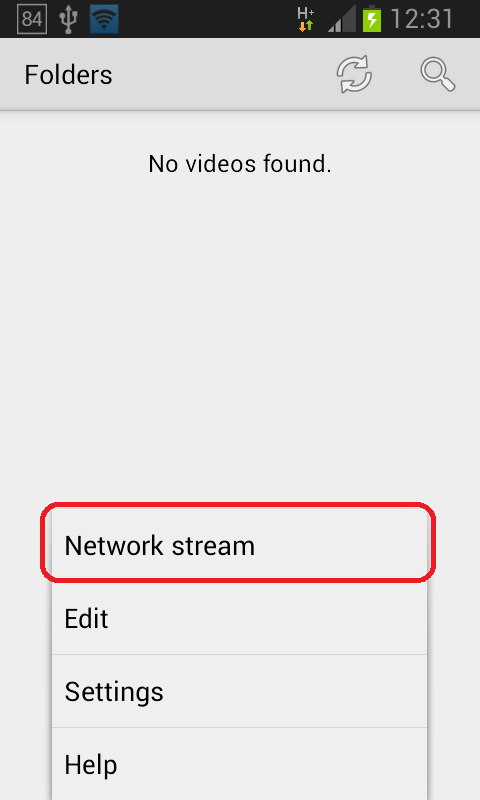
  3. Tap Network stream like screenshot given below.
MX Player - Network stream
Free counters!